
- Platform
- Features
 Franchise & Multi-Unit ManagementCentralize oversight and streamline growth across your entire multi location network
 Learning ManagementTrain, verify, and reward your workforce with mobile-first education
 Operations ExecutionStreamlined operations ensuring brand standards, accountability and efficiency
 Asset ManagementOptimize equipment uptime through proactive maintenance and smart tracking
 Digital Food SafetyAutomate compliance and monitor quality with real-time digital precision
 Health & Safety Management (EHS)Mitigate workplace risks and streamline digital incident reporting and investigations
- Platform Essentials
 Powerful ReportingAlign leadership with role-based dashboards and deeper analytics
 Operandio IntelligenceAutomate content, analyze trends, and provide instant answers
 IntegrationsUnify your enterprise tech stack with real-time data
 IoT PlatformDetect anomalies and automate workflows with intelligent sensors
 Mobile & Shared Tablet AppsSecurely empower frontline teams with fast, offline-capable access
- Footer


 Not sure what you need?
Book in a call with the team
- Features
- Solutions
- By Industry
 RestaurantsQSR, fast food and multi-unit restaurants
 Hotels & ResortsHotels, resorts and extended stay hotels
 ChildcareEarly education, childcare, daycare and preschool
 EntertainmentTheme parks, family entertainment centers and play centers
 Fitness Centers & LeisureFitness centers, golf clubs, gyms and sports facilities
 RetailBig-box retailers, franchise stores and supermarkets
- By Use Case
- Operational ExcellenceStreamlined operations ensuring brand standards, accountability and efficiency
- Learning & DevelopmentTrain, verify, and reward your workforce with mobile-first education
- Franchise & Multi-Unit ManagementCentralize oversight and streamline growth across your entire multi location network
- Food Safety ComplianceAutomate compliance and monitor quality with real-time digital precision
- Asset Management & MaintenanceOptimize equipment uptime through proactive maintenance and smart tracking
- Health & Safety Management (EHS)Mitigate workplace risks and streamline digital incident reporting and investigations
- By Industry
- Resources

- Platform
- Features
- Franchise & Multi-Unit ManagementCentralize oversight and streamline growth across your entire multi location network
- Learning ManagementTrain, verify, and reward your workforce with mobile-first education
- Operations ExecutionStreamlined operations ensuring brand standards, accountability and efficiency
- Asset ManagementOptimize equipment uptime through proactive maintenance and smart tracking
- Digital Food SafetyAutomate compliance and monitor quality with real-time digital precision
- Health & Safety Management (EHS)Mitigate workplace risks and streamline digital incident reporting and investigations
- Platform Essentials
- Powerful ReportingAlign leadership with role-based dashboards and deeper analytics
- Operandio IntelligenceAutomate content, analyze trends, and provide instant answers
- IntegrationsUnify your enterprise tech stack with real-time data
- IoT PlatformDetect anomalies and automate workflows with intelligent sensors
- Mobile & Shared Tablet AppsSecurely empower frontline teams with fast, offline-capable access
- Footer
- Not sure what you need?
Book in a call with the team
- Features
- Solutions
- By Industry
- RestaurantsQSR, fast food and multi-unit restaurants
- Hotels & ResortsHotels, resorts and extended stay hotels
- ChildcareEarly education, childcare, daycare and preschool
- EntertainmentTheme parks, family entertainment centers and play centers
- Fitness Centers & LeisureFitness centers, golf clubs, gyms and sports facilities
- RetailBig-box retailers, franchise stores and supermarkets
- By Use Case
- Operational ExcellenceStreamlined operations ensuring brand standards, accountability and efficiency
- Learning & DevelopmentTrain, verify, and reward your workforce with mobile-first education
- Franchise & Multi-Unit ManagementCentralize oversight and streamline growth across your entire multi location network
- Food Safety ComplianceAutomate compliance and monitor quality with real-time digital precision
- Asset Management & MaintenanceOptimize equipment uptime through proactive maintenance and smart tracking
- Health & Safety Management (EHS)Mitigate workplace risks and streamline digital incident reporting and investigations
- By Industry
- Resources
Enterprise Learning Management: Benefits and Best Practices
Key Takeaways
- Enterprise learning management gives multi-unit brands one place to create, deliver, and track training across all sites.
- It strengthens compliance with automated reminders, digital proof, and complete visibility across locations.
- It replaces scattered workflows with a single system that keeps each role aligned with the same standards.
- Operandio brings an extra layer by pairing training with operations execution so staff learn and act in one mobile flow.
Operational standards break down fast when each franchise location creates its own version of training, checklists, and daily procedures.
Small differences turn into significant gaps. Staff learn tasks in different ways. Managers track progress with different tools. Compliance slips through the cracks.
Enterprise learning management fixes this. It gives you one system for every module, path, and requirement. It shows progress across sites, prevents compliance gaps, and keeps each role aligned with the same standards.
In this guide, you’ll see how ELM works, why it matters for multi-unit brands, LMS examples to make it concrete, and how to roll it out with confidence.
What is Enterprise Learning Management?
Enterprise learning management (ELM) gives organizations one platform to design, deliver, and track all employee training.
Instead of relying on in-person sessions or scattered tools, an ELM system brings course creation, progress tracking, training records, and compliance documentation into a single workflow.
It supports online modules, role-based assignments, certifications, and automated reminders. Reporting and analytics help you see which teams understand the standards and where gaps still exist.
In short, ELM provides a structured, efficient way to manage training at scale while raising consistency across locations.
For restaurant learning management systems, this means a new hire in Portland receives the same food safety culture, service, and equipment training as someone in Phoenix. No variations. No gaps. Consistency across every site.
Enterprise Learning Management vs Traditional LMS
Traditional LMS platforms work fine for single locations or corporate offices. Enterprise learning management addresses the challenges of scale, complexity, and distributed workforces.
| Criteria | Traditional LMS | Enterprise Learning Management |
| User Scale | 10-500 users | 1,000-100,000+ users |
| Location Management | Single-site focus | Multi-location with site-specific and global content |
| Content Control | Basic course library | Centralized repository with role-based access and localized versions |
| Reporting | Individual completion reports | Enterprise dashboards with location, region, and role-level analytics |
| Mobile Access | Often limited or an afterthought | Mobile-first design for deskless workers |
| Integration | Basic integrations | Deep integration with HR, operations, and compliance systems |
| Compliance Tracking | Manual verification | Automated tracking, certification management, and audit trails |
| Deployment | Quick but limited | Phased rollout with change management support |
Challenges of Managing Learning at Enterprise Scale
Large operations face problems that don’t appear in single-site businesses. These gaps weaken consistency and raise risk.
Challenge #1: Inconsistent Training Delivery
Different locations teach tasks in various ways. Some follow outdated binders. Others rely on old videos.
This leads to uneven guest experiences. Operandio fixes this with one restaurant learning system that updates across all sites at once.
Challenge #2: No Clear Compliance Visibility
Without the right dashboard, you can’t see who completed training, which certifications have expired, or which site has missed key steps.
Many brands still use folders or spreadsheets. Operandio solves this through automated alerts and audit-ready records.
Challenge #3: Fragmented, Outdated Tools
Training content sits in many places: drives, PDFs, emails, and messages.
Updates never reach every site. Staff keep old habits alive. Operandio replaces this with one source of truth, removing the cost shown in fragmented systems analysis.
Challenge #4: Low Frontline Engagement
Frontline teams avoid long modules and desktop logins. They want short steps on mobile. Operandio delivers this through clear paths and fast mobile access.
Challenge #5: High Turnover and Endless Onboarding
Large brands hire new staff each week. Managers repeat the same steps over and over.
Operandio assigns role-based training paths so new hires start strong without extra admin work.
Why Upgrade to an ELM Platform?
Weak systems drain time and expose brands to compliance risk. ELM fixes this by:
- making standards uniform
- showing progress and gaps
- holding proof for audits
- speeding onboarding
- supporting each role across sites
Operandio takes this further by tying ELM into operations execution, which closes the gap between training and daily action.
Key Features of an Enterprise Learning Management System
Feature #1: Centralized Content Repository
All SOPs, policies, modules, and updates live in one place. No more outdated PDFs or scattered folders. Operandio stores current versions, so each site follows the same steps.
Feature #2: Role-Based Learning Paths
Servers, cooks, supervisors, and safety leads need different content. Operandio builds paths that shift with job and site changes.
Feature #3: Automated Compliance Tracking
A strong ELM tracks certifications, warns before deadlines, and stores digital proof. Operandio adds alerts inside digital food safety workflows so nothing slips.
Feature #4: Mobile Access for Deskless Teams
Frontline teams use phones for real work. Training should live there too. Operandio provides full mobile access with short modules and quick checks.
Feature #5: Reporting Dashboards and Analytics
You need clarity across all sites. Operandio dashboards show site-level gaps, risk areas, and completion rates. This helps you act early and prevent failures.
Feature #6: Integration With HR and Ops Tools
ELM must fit into your stack. Operandio connects to HR systems and franchise tools such as franchise management software, so training stays linked to real tasks.
What Makes an ELM Stand Out from Competitors
Basic enterprise learning platforms check feature boxes. Great ones solve actual operational problems for multi-unit organizations.
Built for your industry, not adapted from corporate offices. Some platforms were designed for tech companies and office workers. They add “hospitality features” as afterthoughts. Look for systems built specifically for retail operations, restaurant operations, or your vertical. The difference shows in usability and relevance.
Training connects to daily operations. The best platforms don’t treat training as separate from work. Staff complete food safety training. The system immediately assigns related daily tasks. Temperature checks. Equipment sanitization. Proper storage procedures. Learning leads directly to doing.
Support for high-turnover environments. Quick onboarding modules get new staff productive in days, not weeks. Mobile-first design works for teams that never sit at desks. Role-based content prevents information overload. The platform acknowledges that 100%+ annual turnover is a reality, not an exception.
Proven in environments like yours. Ask vendors about customers in your industry. How many locations do they operate? What’s their implementation timeline? What completion rates do they achieve? Generic answers suggest a generic experience. Specific results prove real-world success.
Partnership approach to implementation. Poor vendors sell software and disappear. Strong vendors become partners in your success. They provide change management support. They help you build initial content. They train your trainers. They review analytics with you quarterly and suggest improvements.
How to Implement an Enterprise Learning Management System
Rolling out enterprise learning management across multiple locations requires a strategy. Quick wins build momentum. Proven processes scale smoothly.
Step 1: Start With a Clear Training Audit
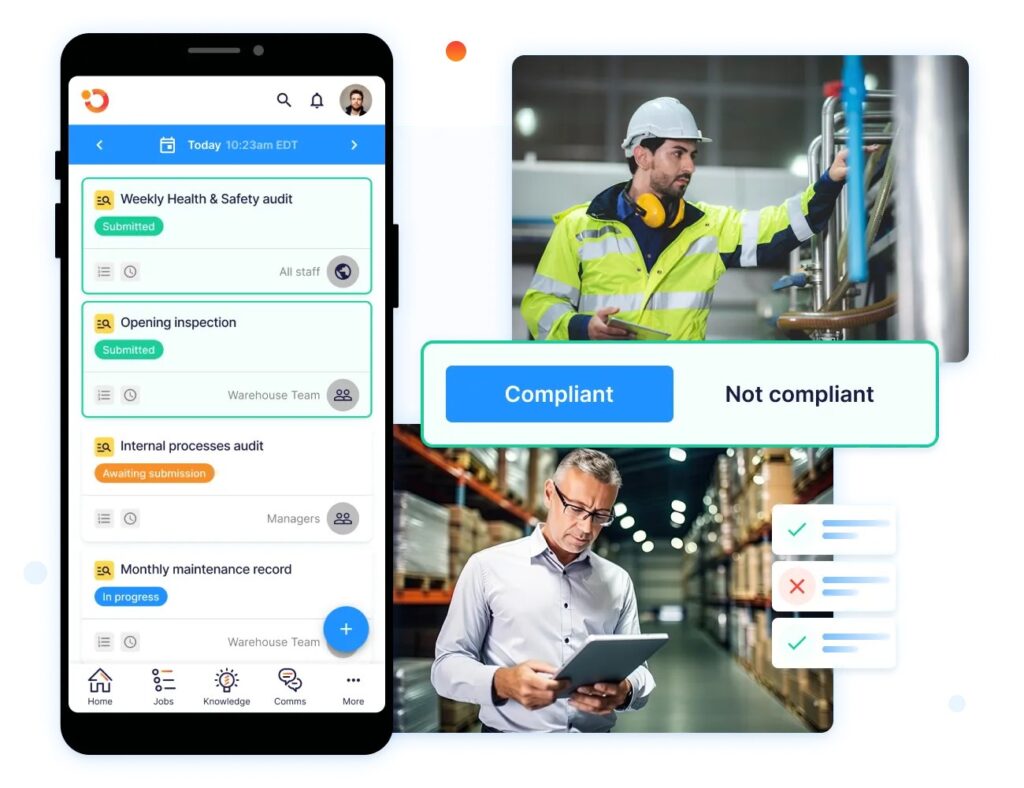
Document your current state before changing anything. What training exists today? Where does content live? Who creates materials? How do you track completion? What compliance requirements must you meet?
Identify the most significant pain points. Failed audits. Low completion rates. Inconsistent delivery. Staff confusion about procedures. Prioritize solving problems that cause immediate operational impact.
Review your restaurant training programs and legal requirements for restaurant staff training. Ensure your audit captures all mandatory compliance areas. Missing required training during implementation creates larger problems later.
Step 2: Choose One Department or Location for Initial Rollout
Don’t deploy across all locations simultaneously. Test with a contained group first. One region. One department. One subset of your operation.
Learn what works. Discover friction points. Refine processes before scaling. Early adopters become champions who help with broader rollout.
Choose a location with strong management and low drama for your pilot. Success here builds confidence. Failure in a troubled location proves nothing about the platform.
Step 3: Migrate Core Content First, Then Expand
Start with essential training. Food safety. Brand standards. Required certifications. The content every employee must complete, regardless of role.
Get core content working smoothly before adding specialized training. Master the foundation. Then layer complexity.
For restaurant safety training and food safety, this means starting with critical control points. Temperature monitoring. Proper handwashing. Cross-contamination prevention. These non-negotiable topics go first.
Step 4: Train Trainers Before Training Staff

Your managers and training coordinators need platform expertise before employees access the system. They assign courses. They monitor progress. They troubleshoot issues. They answer questions.
Invest time in trainer certification. Create train-the-trainer materials. Build confidence in the people who will support daily usage.
Bad trainer preparation leads to frustrated staff. Good preparation creates advocates who drive adoption across your organization.
Step 5: Launch with Clear Communication and Support
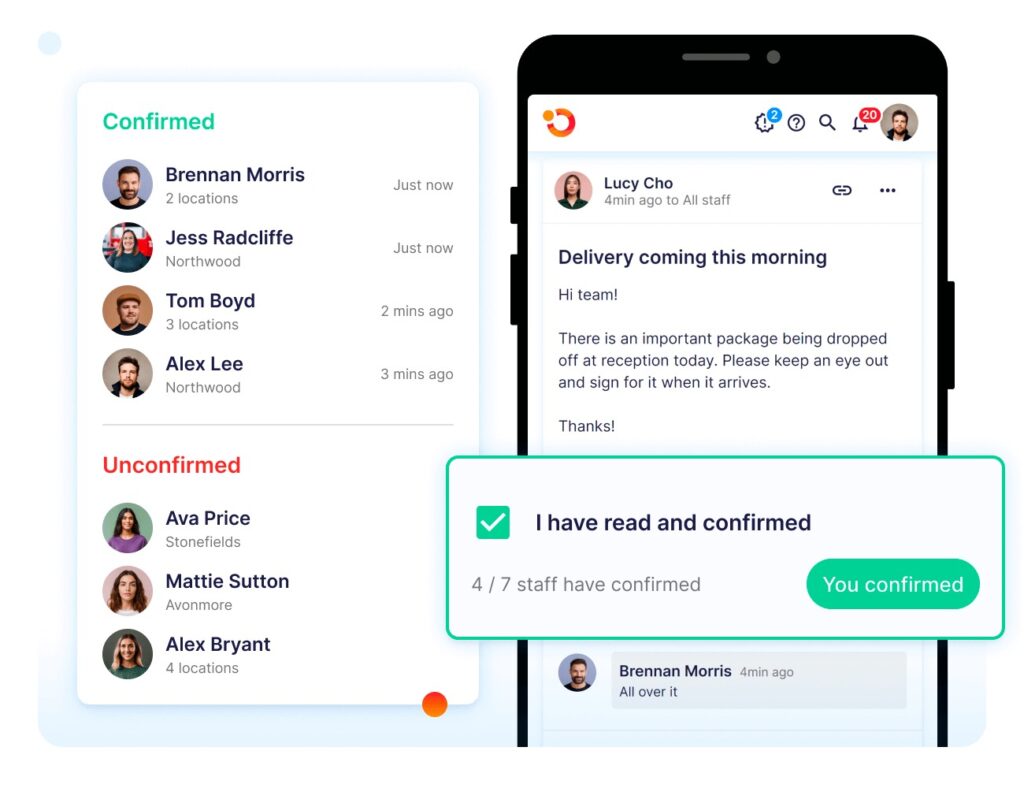
Staff need to understand why you’re changing systems. What problems will this solve? How will it make their work easier? What happens to old training materials?
Create launch communications that answer questions before they’re asked. Video walkthroughs. Quick start guides. FAQ documents. Make support visible and accessible.
Schedule live support during the first week. Someone available to help staff log in, navigate the interface, and complete their first module. Remove barriers to adoption immediately.
Step 6: Monitor, Measure, and Refine Continuously
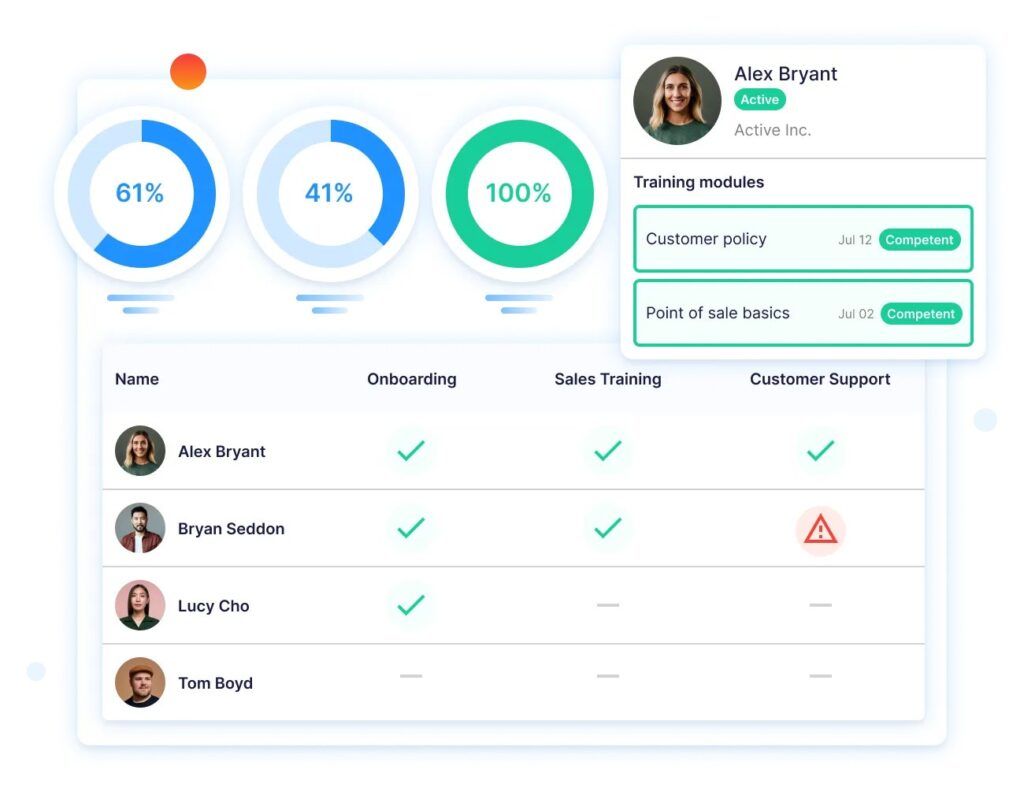
Watch the metrics. Completion rates. Time to complete courses. Drop-off points in modules. User feedback. Support tickets.
Adjust based on data. A module shows a 60% drop-off halfway through. It’s too long or too confusing. Shorten it or split it into two parts.
Build a strong food safety culture by using training data to reinforce behaviours. Celebrate high completion rates. Recognize locations with perfect compliance. Share success stories across your organization.
Schedule quarterly reviews with your platform provider. Discuss what’s working. Identify improvement opportunities. Plan content updates and feature enhancements.
Streamline Multi-Site Training and Operations With Operandio
Training matters when staff apply it during real work. Operandio makes this seamless by pairing enterprise learning with daily task execution.
Teams train and complete checklists, tasks, and compliance tasks on the same mobile device.
You gain full visibility across locations — training progress, task completion, certifications — all in one unified dashboard.
Learn why multi-unit operators choose Operandio.