
- Platform
- Features
 Franchise & Multi-Unit ManagementCentralize oversight and streamline growth across your entire multi location network
 Learning ManagementTrain, verify, and reward your workforce with mobile-first education
 Operations ExecutionStreamlined operations ensuring brand standards, accountability and efficiency
 Asset ManagementOptimize equipment uptime through proactive maintenance and smart tracking
 Digital Food SafetyAutomate compliance and monitor quality with real-time digital precision
 Health & Safety Management (EHS)Mitigate workplace risks and streamline digital incident reporting and investigations
- Platform Essentials
 Powerful ReportingAlign leadership with role-based dashboards and deeper analytics
 Operandio IntelligenceAutomate content, analyze trends, and provide instant answers
 IntegrationsUnify your enterprise tech stack with real-time data
 IoT PlatformDetect anomalies and automate workflows with intelligent sensors
 Mobile & Shared Tablet AppsSecurely empower frontline teams with fast, offline-capable access
- Footer


 Not sure what you need?
Book in a call with the team
- Features
- Solutions
- By Industry
 RestaurantsQSR, fast food and multi-unit restaurants
 Hotels & ResortsHotels, resorts and extended stay hotels
 ChildcareEarly education, childcare, daycare and preschool
 EntertainmentTheme parks, family entertainment centers and play centers
 Fitness Centers & LeisureFitness centers, golf clubs, gyms and sports facilities
 RetailBig-box retailers, franchise stores and supermarkets
- By Use Case
- Operational ExcellenceStreamlined operations ensuring brand standards, accountability and efficiency
- Learning & DevelopmentTrain, verify, and reward your workforce with mobile-first education
- Franchise & Multi-Unit ManagementCentralize oversight and streamline growth across your entire multi location network
- Food Safety ComplianceAutomate compliance and monitor quality with real-time digital precision
- Asset Management & MaintenanceOptimize equipment uptime through proactive maintenance and smart tracking
- Health & Safety Management (EHS)Mitigate workplace risks and streamline digital incident reporting and investigations
- By Industry
- Resources

- Platform
- Features
- Franchise & Multi-Unit ManagementCentralize oversight and streamline growth across your entire multi location network
- Learning ManagementTrain, verify, and reward your workforce with mobile-first education
- Operations ExecutionStreamlined operations ensuring brand standards, accountability and efficiency
- Asset ManagementOptimize equipment uptime through proactive maintenance and smart tracking
- Digital Food SafetyAutomate compliance and monitor quality with real-time digital precision
- Health & Safety Management (EHS)Mitigate workplace risks and streamline digital incident reporting and investigations
- Platform Essentials
- Powerful ReportingAlign leadership with role-based dashboards and deeper analytics
- Operandio IntelligenceAutomate content, analyze trends, and provide instant answers
- IntegrationsUnify your enterprise tech stack with real-time data
- IoT PlatformDetect anomalies and automate workflows with intelligent sensors
- Mobile & Shared Tablet AppsSecurely empower frontline teams with fast, offline-capable access
- Footer
- Not sure what you need?
Book in a call with the team
- Features
- Solutions
- By Industry
- RestaurantsQSR, fast food and multi-unit restaurants
- Hotels & ResortsHotels, resorts and extended stay hotels
- ChildcareEarly education, childcare, daycare and preschool
- EntertainmentTheme parks, family entertainment centers and play centers
- Fitness Centers & LeisureFitness centers, golf clubs, gyms and sports facilities
- RetailBig-box retailers, franchise stores and supermarkets
- By Use Case
- Operational ExcellenceStreamlined operations ensuring brand standards, accountability and efficiency
- Learning & DevelopmentTrain, verify, and reward your workforce with mobile-first education
- Franchise & Multi-Unit ManagementCentralize oversight and streamline growth across your entire multi location network
- Food Safety ComplianceAutomate compliance and monitor quality with real-time digital precision
- Asset Management & MaintenanceOptimize equipment uptime through proactive maintenance and smart tracking
- Health & Safety Management (EHS)Mitigate workplace risks and streamline digital incident reporting and investigations
- By Industry
- Resources
How to Label Food In a Commercial Kitchen or Restaurant
Key takeaways
- Labels keep food safe and keep you compliant: Clear labels help your teams track when food was prepped, and when it should be discarded.
- Labels reduce waste and chaos: With the right labels, your teams can rotate stock faster and stop guessing what’s still usable.
- Use the right label for the job: For the cleanest labeling system, use by-dates for timelines, color/day dots for FIFO, and allergen markers for high-risk items.
- A labeling system saves time and prevents mistakes: Templates and automatic date calculations will reduce handwriting errors and keep your shifts consistent.
Running a commercial kitchen comes with its fair share of *challenges* (“Understatement Of The Month”, right there…). Between juggling endless orders, maintaining strict health standards, and keeping everything running smoothly, even the smallest oversight (like a missing label on a container) can quickly turn into a bigger headache.
Food labeling is the simplest way to prevent waste, reduce food safety risk, and keep every shift following the same rules.
In this guide, you’ll learn what every label should include, how to set clear date-marking rules by food category, and the best practices that keep labels readable, consistent, and audit-ready.
We’ll also cover how a digital labeling system like Operandio helps kitchens print correct labels fast, eliminate handwriting errors, and keep templates consistent across locations.
The importance of labeling food in a commercial kitchen
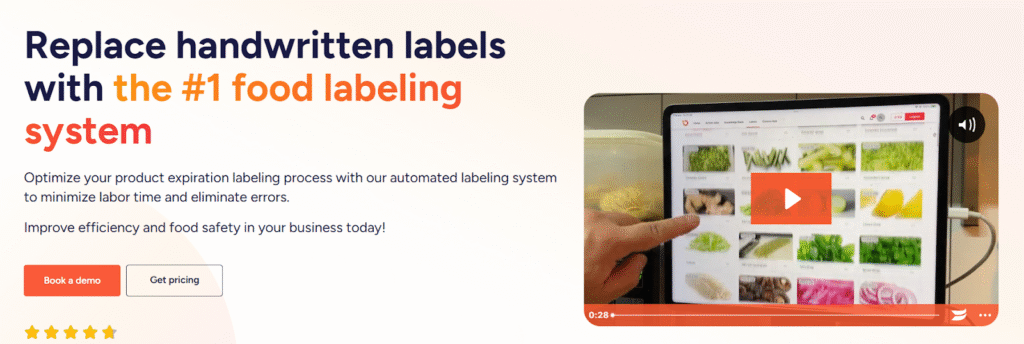
Labeling is the simplest control a busy kitchen can rely on. When every container shows what it is, when it was made, and when it should be used, teams move faster, waste drops, and food safety becomes easier to verify.
Here’s why labeling food in a commercial kitchen and a strong food safety culture shouldn’t be overlooked:
Food safety and compliance stay consistent
Labels help you to easily monitor your food safety. Instead of guessing, your staff can use food safely because they show the prep date and discard date right on the container. That way, nobody has to guess, even during busy shifts or handoffs.
Allergen risk and cross-contact become easier to manage
Clear labeling keeps allergen information close to the food, not buried in a binder. When prep containers and grab-and-go items show relevant allergens, your team can reduce accidental cross-contact and protect guests who can have allergic reactions.
Waste drops and inventory rotation improve
When teams can quickly see prep and discard dates, you can significantly reduce waste. FIFO becomes practical, not theoretical. Labels make it easier to use older products first, spot items that need attention, and avoid throwing away food because nobody knows when it was made.
Service stays faster and more consistent
Labels remove micro-delays: searching, opening containers, or asking coworkers what something is. That speeds up prep, reduces rework, and helps new team members follow the same process as experienced staff.
Accountability improves across shifts and locations
Labels create a shared source of truth. When you include initials or station identifiers, you reduce “mystery container” problems and make it easier for managers to coach, standardize, and verify that the same rules apply every day.
A simple labeling system, supported by compliance software, can improve kitchen workflow, reduce costs, and keep your business compliant with health regulations.
Types of food labels (and which one you should use)
Not all food labels serve the same purpose. Choosing the right one can make your kitchen safer, more organized, and much easier to manage. When you understand the types of food labels (and which one you should use), you’ll streamline your labeling process and keep everything running smoothly, without second-guessing what’s in that unlabeled container on the top shelf.
Here are the main types of food labels and when to use them:
Expiration date codes
Use for prepped ingredients, sauces, proteins, and anything you store for later use. These labels show a clear prep/open date and a discard or use-by date so teams follow safe holding times without guessing.
Day dots and color-coded day-of-week labels
Use when speed matters. Color-coded labels make FIFO obvious at a glance, which helps teams rotate product correctly even during rush periods and shift handoffs.
Grab-and-go labels
Use for ready-to-sell items such as packaged salads, desserts, or drinks. These labels typically include item name, prep/pack date, use-by date, and allergen information for customer-facing clarity.
Allergen and special-handling labels
Use for items that need extra control such as allergen-containing ingredients, gluten-free prep, or foods requiring specific handling. These labels reduce cross-contact risk by keeping warnings on the container, not only in recipes.
Batch, station, and prep labels
Use when multiple people prep the same items. Add station, initials, or batch notes so teams can trace issues back to the right prep flow and keep standards consistent.
| Label Type | Purpose | When to Use |
| Use-by Date | Food safety – must be used before this date | Perishable items like dairy, meat, and seafood |
| Best-before Date | Quality – food is best before this date | Non-perishables like dry goods and canned foods |
| Color-coded Labels | Quick identification of preparation days | Daily-prepped items, FIFO management |
| Custom Allergen Labels | Identifies allergens (nuts, dairy, gluten) | Allergen-sensitive foods |
| Day-dot Labels | Tracks food prep dates | All stored/prepped foods for FIFO management |
Best practices when labeling food in a commercial kitchen
Labeling works when it runs as a simple system: same fields, same placement, same rules, every shift. Use these best practices to keep labels consistent, readable, and audit-ready.
A digital system like Operandio helps by standardizing templates, automating date calculations, and making it easy to roll out the same labeling rules across stations or locations.
Standardize What Every Label Must Include
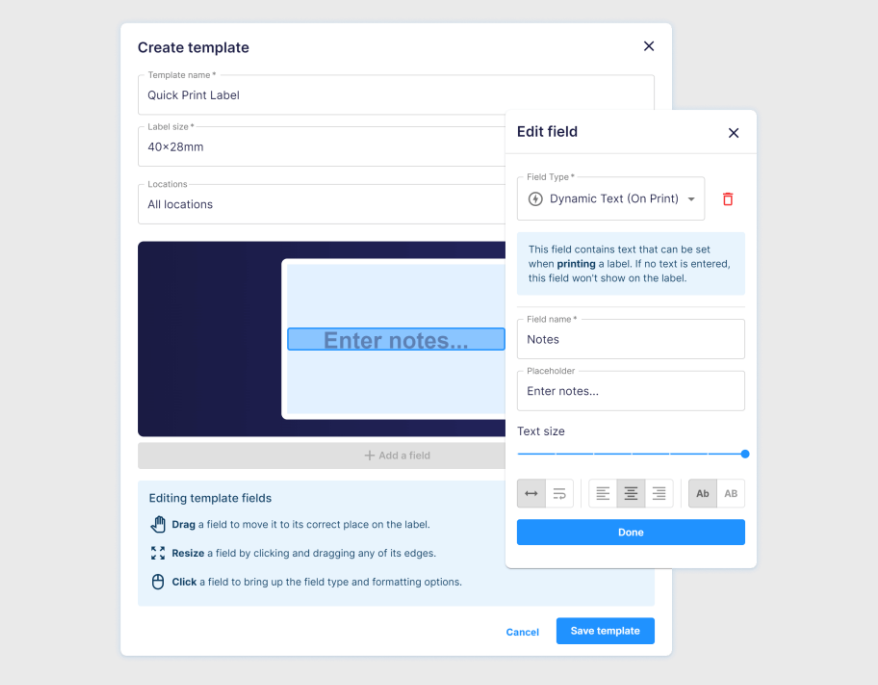
At minimum, include: item name, prep/open date, discard or use-by date, and initials. Add storage location (fridge/freezer/dry), allergens, and batch or station notes when your operation needs tighter control.
With Operandio, you can build label templates that always include the fields you require, so staff don’t skip critical info during a rush.
When you standardize templates centrally, every shift prints the same format, which reduces training time and keeps compliance consistent.
Define Date-Marking Rules by Food Category
Create rules for ready-to-eat foods, raw proteins, sauces, cooled foods, and grab-and-go items. Train teams on what triggers a new label (repackaging, cooling, thawing, or combining batches).
Operandio supports the kind of category-based labeling that makes these rules stick in real life. You can set up date-code items and expiration periods so the system handles the date math instead of relying on memory, which helps prevent “looks fine” decisions that turn into waste or risk later.
Place Labels Where Your Team Will See Them
Put labels on the front of containers, not only on lids. Keep them visible without moving other items, and choose label stock that holds up in cold storage and moisture.
Fast, consistent printing supports this habit. With Operandio, label printing is quick and simple, so your teams can label correctly in the moment instead of postponing it.
Use Color Coding to Make FIFO Automatic
Day-of-week colors and day dots reduce decision time. Teams can rotate products correctly at a glance, which helps prevent waste and reduces the odds that older items get buried in the back of the fridge.
Operandio’s labeling system supports common label types like day dots and date codes, which makes FIFO easier to standardize across the whole kitchen. That matters most when you run multiple prep stations or multiple sites and want the same rotation rules everywhere.
Use Templates and Automation to Remove Handwriting Errors
Handwritten labels often mean missing fields, unclear dates, and inconsistent formats. Template-based labels standardize required fields and reduce date-math errors, especially when prep volume spikes or staffing changes
Operandio focuses on automating the labeling workflow, so your teams print consistent labels without slowing down. Central templates also help you enforce the same formatting and date rules across shifts, so labeling quality doesn’t depend on who happens to be working that day.
Build a Simple Verification Habit
Make labeling part of opening, mid-shift, and closing checks. Teams should relabel when food moves containers, confirm labels match what’s inside, and discard items that lack a clear prep and discard timeline.
This is where software helps you stay consistent. When labels follow a standard format and printing stays fast, managers can build quick verification into routine checks without turning it into a manual audit.
If you operate more than one location, centralized template management also makes it easier to keep every site aligned as products, menus, and prep processes change.
Why you Should use a Food Labeling System in a Commercial Kitchen
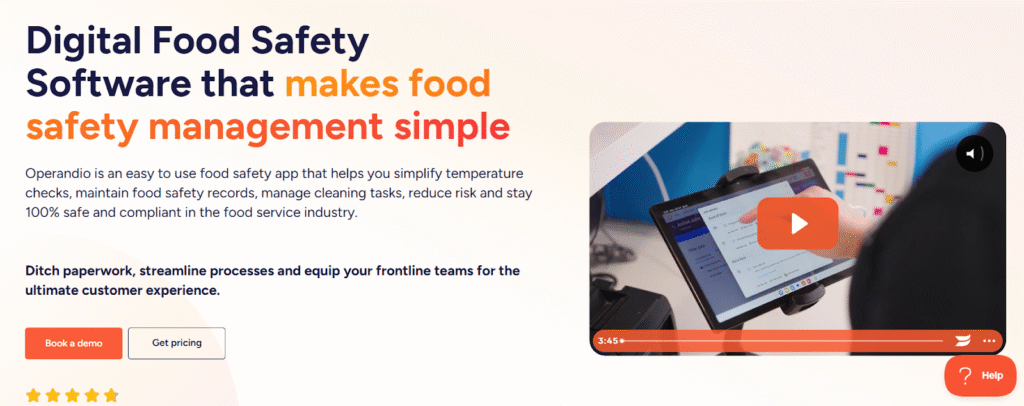
A food labeling system turns labeling from a “best effort” habit into a controlled process. Instead of relying on memory and handwriting, you standardize what goes on every label and remove date math from the moment of prep. That reduces preventable mistakes, keeps FIFO tighter, and makes it easier to verify compliance across shifts.
The biggest benefit shows up when labeling connects to daily food safety routines: recurring checks, temperature capture, and corrective actions.
When teams manage these tasks in one system, they can maintain efficiency, their managers have better visibility, staff waste less time, and kitchens stay consistent across locations.
If you manage multiple stations or locations, a system also helps you standardize templates and roll out updates without retraining every team. You can keep product names, label fields, and expiration periods aligned so labels stay consistent even when staffing changes or volume spikes.
Benefits of Using a Food Label Printer
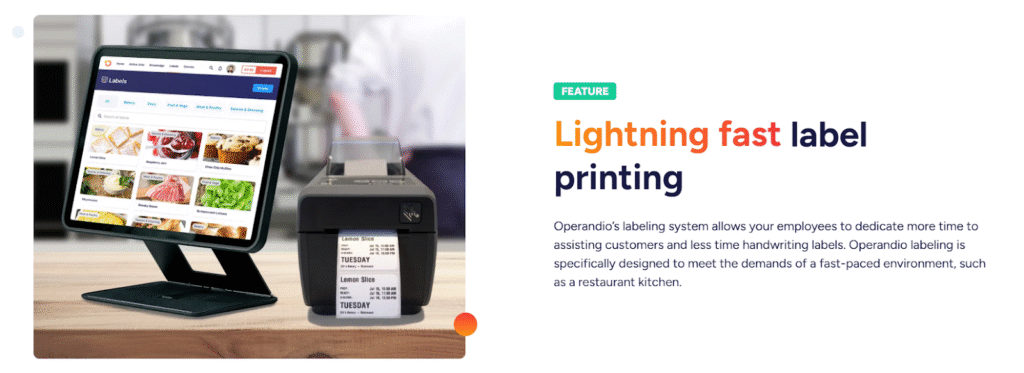
A label printer makes labeling faster and more consistent, especially when service is busy and handwriting falls apart. Here are the most practical benefits kitchens see after switching to printed labels.
Faster Labeling During Prep and Peak Service
Handwritten labels slow teams down because they interrupt prep flow. A printer cuts labeling to seconds, which makes it more likely staff label immediately instead of stacking unlabeled containers “for later.”
That prevents the classic end-of-shift pileup where someone rushes through labels, misses fields, or guesses dates.
Clear, Consistent Labels That Don’t Rely on Handwriting
Handwriting can often mean different date formats, missing initials, unclear item names, and labels only one person understands. Printed labels fix that by standardizing the format so every label looks the same and includes what your kitchen requires.
That helps new hires and float staff because they won’t struggle to decode what’s in a container.
Better FIFO and Less Food Waste
If dates are hard to read, inconsistent, or missing, the product gets pushed to the back and forgotten. Clear printed labels make rotation automatic the staff can spot what needs using first without stopping to interpret handwriting.
Over time, that reduces over-prep, prevents unnecessary discards from uncertainty, and helps managers tighten ordering because inventory stays visible and trustworthy.
Easier Compliance Checks and Stronger Food Safety Habits
Labels make time and handling rules visible right where decisions happen: at the container. That helps teams follow date marking and holding rules without relying on memory or informal training.
During line checks and cooler walks, managers can confirm compliance in seconds, catch patterns (like a station missing discard dates), and coach on the spot.
Less Human Error When Volume Spikes
Mistakes happen when prep volume spikes or staffing changes. A printer reduces those mistakes by making labeling quick and consistent under pressure. It also helps prevent rework; the staff doesn’t need to relabel containers because the label is smeared or has fallen off, and managers don’t need to investigate unlabeled items mid-service.
Cleaner Handoffs Between Shifts and Stations
If a container lacks a clear prep date or discard timeline, the next shift either risks using it or throws it away to be safe. When every label follows the same format and stays readable, the next shift can make confident decisions quickly. That protects both safety and margin.
Minimize Labeling Time and Eliminate Errors With Operandio
Operandio helps you move labeling from “someone should do this” to a repeatable, low-effort system. Teams print labels fast, in a consistent format, with the right dates and fields every time, even during rush periods and shift handoffs.
Easy Label Management

When teams handwrite labels, mistakes show up in predictable ways: missing fields, inconsistent formats, and wrong discard timelines because someone guessed or did the date math in their head. Operandio solves this by letting you create and manage label templates centrally, then generate labels with the correct information and timing built in.
Use it to generate labels for: expiration date codes, day dots, grab-and-go items, and more.
Control Your Label Templates on the Go
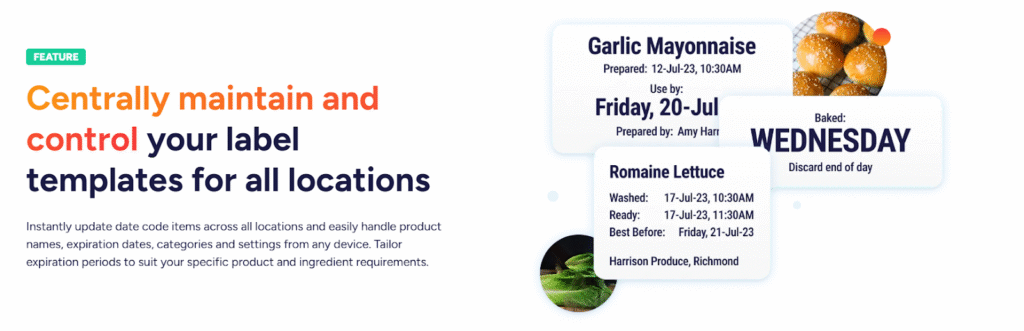
Multi-location kitchens struggle with drift: different sites label the same product differently, use different formats, or apply different shelf-life rules. Operandio gives managers one control point for label templates so every location runs the same system.
That makes it easier to:
- Update date-code items across all locations: without retraining every team.
- Manage product names and categories: so labels stay consistent and searchable.
- Adjust expiration periods: to match your specific prep process and ingredient requirements.
- Keep settings aligned: across locations, stations, and shifts from any device.
A Faster Workflow That New Staff Can Follow
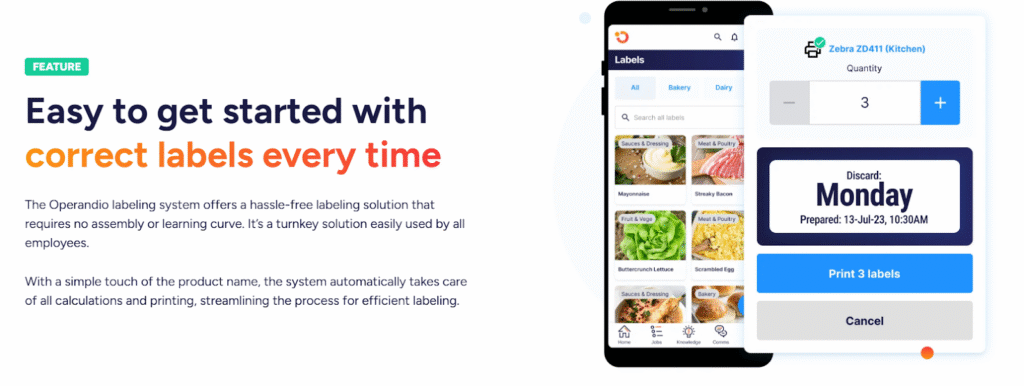
A labeling system only works if teams actually use it when it counts. Operandio keeps the workflow simple so staff can label in the moment instead of postponing it until “later.”
The result: faster labeling, fewer errors, cleaner FIFO, and easier verification during line checks and cooler walks.
“If you haven’t incorporated Operandio into your operations, you’re overlooking a valuable tool. The reporting access has been a game-changer for our verifiers, saving them at least an hour during onsite visits.” – Mauro O, Head of Operations, Abacus
Ready to simplify food labeling? Book your free demo with Operandio today and keep your kitchen running like clockwork.

Frequently Asked Questions
Why are day-of-the-week food labels color-coded?
Color-coded labels help kitchens follow the First In, First Out (FIFO) method by making it easy to identify when food was prepared. Each day is assigned a color, allowing staff to quickly spot older items and use them before fresher stock.
What information should be included on any food labeling within a commercial kitchen?
Every food label should have clear, legible information that includes:
- Food name – So staff know exactly what’s inside.
- Preparation date & expiration date – To track freshness and avoid serving expired food.
- Storage instructions – Indicating refrigeration, freezing, or dry storage needs.
- Allergen warnings – If applicable, to prevent cross-contamination and ensure customer safety.
How do you calculate expiration dates for prep labels?
Set clear holding rules for each product or ingredient, then apply them consistently. Many kitchens use templates so the discard timeline stays consistent and staff do not need to do date math during a rush.
What printers can I use with Operandio’s labeling system?
Operandio supports a wide range of label printers. If you already have a printer, the team can confirm compatibility. If you have not purchased one yet, they can guide you toward the best solution for your kitchen.
What devices can staff use to print labels?
Teams can access the labeling system from phones, tablets, or computers, which makes it easy to run labeling from a shared kitchen tablet or a manager device.
Is it easy to update label templates across locations?
Yes. Centralized templates make it easier to keep naming, label fields, and expiration periods consistent across locations. When something changes, you can update once and keep every site aligned.
Should you relabel food when you transfer it to a new container?
Yes. Relabel when you repackage, combine batches, or move food into a new container so the label matches what is inside and the timeline stays clear for anyone who uses it later.