
- Platform
- Features
 Operations ExecutionStreamlined operations ensuring brand standards, accountability and efficiency
 Learning ManagementTrain, verify, and reward your workforce with mobile-first education
 Franchise & Multi-Unit ManagementCentralize oversight and streamline growth across your entire multi location network
 Digital Food SafetyAutomate compliance and monitor quality with real-time digital precision
 Asset ManagementOptimize equipment uptime through proactive maintenance and smart tracking
 Health & Safety Management (EHS)Mitigate workplace risks and streamline digital incident reporting and investigations
- Platform Essentials
 AI-Powered ToolsAutomate content, analyze trends, and provide instant answers
 IntegrationsUnify your enterprise tech stack with real-time data
 Powerful ReportingAlign leadership with role-based dashboards and deeper analytics
 IoT PlatformDetect anomalies and automate workflows with intelligent sensors
 Mobile & Shared Tablet AppsSecurely empower frontline teams with fast, offline-capable access
- Footer


 Not sure what you need?
Book in a call with the team
- Features
- Solutions
- By Industry
 RestaurantsQSR, fast food and multi-unit restaurants
 Hotels & ResortsHotels, resorts and extended stay hotels
 ChildcareEarly education, childcare, daycare and preschool
 EntertainmentTheme parks, family entertainment centers and play centers
 Fitness Centers & LeisureFitness centers, golf clubs, gyms and sports facilities
 RetailBig-box retailers, franchise stores and supermarkets
- By Use Case
- Operational ExcellenceStreamlined operations ensuring brand standards, accountability and efficiency
- Learning & DevelopmentTrain, verify, and reward your workforce with mobile-first education
- Franchise & Multi-Unit ManagementCentralize oversight and streamline growth across your entire multi location network
- Food Safety ComplianceAutomate compliance and monitor quality with real-time digital precision
- Asset Management & MaintenanceOptimize equipment uptime through proactive maintenance and smart tracking
- Health & Safety Management (EHS)Mitigate workplace risks and streamline digital incident reporting and investigations
- By Industry
- Resources

- Platform
- Features
- Operations ExecutionStreamlined operations ensuring brand standards, accountability and efficiency
- Learning ManagementTrain, verify, and reward your workforce with mobile-first education
- Franchise & Multi-Unit ManagementCentralize oversight and streamline growth across your entire multi location network
- Digital Food SafetyAutomate compliance and monitor quality with real-time digital precision
- Asset ManagementOptimize equipment uptime through proactive maintenance and smart tracking
- Health & Safety Management (EHS)Mitigate workplace risks and streamline digital incident reporting and investigations
- Platform Essentials
- AI-Powered ToolsAutomate content, analyze trends, and provide instant answers
- IntegrationsUnify your enterprise tech stack with real-time data
- Powerful ReportingAlign leadership with role-based dashboards and deeper analytics
- IoT PlatformDetect anomalies and automate workflows with intelligent sensors
- Mobile & Shared Tablet AppsSecurely empower frontline teams with fast, offline-capable access
- Footer
- Not sure what you need?
Book in a call with the team
- Features
- Solutions
- By Industry
- RestaurantsQSR, fast food and multi-unit restaurants
- Hotels & ResortsHotels, resorts and extended stay hotels
- ChildcareEarly education, childcare, daycare and preschool
- EntertainmentTheme parks, family entertainment centers and play centers
- Fitness Centers & LeisureFitness centers, golf clubs, gyms and sports facilities
- RetailBig-box retailers, franchise stores and supermarkets
- By Use Case
- Operational ExcellenceStreamlined operations ensuring brand standards, accountability and efficiency
- Learning & DevelopmentTrain, verify, and reward your workforce with mobile-first education
- Franchise & Multi-Unit ManagementCentralize oversight and streamline growth across your entire multi location network
- Food Safety ComplianceAutomate compliance and monitor quality with real-time digital precision
- Asset Management & MaintenanceOptimize equipment uptime through proactive maintenance and smart tracking
- Health & Safety Management (EHS)Mitigate workplace risks and streamline digital incident reporting and investigations
- By Industry
- Resources
How to Create an Ops Manual: Process, Template & 5 Best Tips
Key Takeaways
- An ops manual is the single source of truth for how work gets done. It documents procedures, roles, safety rules, and quality standards so any employee can step in and do the job right, even during busy shifts, staff changes, or multi-location growth.
- The best manuals are built around real risk and honest work. Start with high-risk, high-frequency tasks like food safety, cash handling, and opening and closing, then capture how your best people actually do the job with clear, step-by-step instructions and simple visuals.
- When manuals are easy to find, always current, and tied to accountability, training time drops, audits get easier, and every shift delivers the same brand experience without constant manager oversight.
An ops manual documents your franchise’s work procedures, policies, and processes that guide your daily operations.
It captures what experienced employees know, so your business runs consistently regardless of who’s on shift.
This guide shows what belongs in an operations manual, how to build one without overwhelming your team, and why most manuals fail.
You’ll learn which processes to document first, challenges franchise operators face, and how digital tools solve the adoption problems that paper manuals create.
What is an Ops Manual?
An ops manual explains how your business runs day-to-day. It documents procedures, policies, reporting lines, and what to do during routine work and emergencies.
For example, a quick-service restaurant manual covers opening and closing, food prep, customer service, cash handling, equipment care, and emergency contacts. Staff use it during shifts, not just in training.
Benefits of Creating an Ops Manual
Operations manuals reduce errors, save time, and maintain standards across locations.
Maintains Consistency Across Locations
Most multi-unit franchises struggle when each location develops its own procedures. An ops manual establishes a known standard process for every area to follow.
This is to ensure your customers receive identical service at any location.
Enables Effective Staff Management
Clear procedures remove guesswork from staff management. Your managers know what “a job done right” looks like, and employees know what’s expected. When issues come up, conversations stay objective and focused on whether the documented steps were followed, not opinions or assumptions.
Creates Baseline for Improvements
You can’t improve what you haven’t documented. Operations manuals create a knowledge base for measuring efficiency.
When you update a procedure, you know exactly what changed and can track results. This beats random trial-and-error for improving restaurant operations.
Strengthens Food Safety Culture
Documented sanitation, food labeling protocols, and safety standards create accountability.
Staff can’t claim they “didn’t know” proper procedures. Regular manual references reinforce a food safety culture more effectively than annual training.

What to Include in an Ops Manual
Practical manuals cover essential areas without overwhelming users.
Company Overview and Mission
Start with mission, vision, and core values. Explain what your business does and why.
This context helps employees understand how their work connects to larger goals. Keep it brief, one page maximum.
Organizational Structure
You can document the hierarchy with a chart that shows departments, positions, and reporting lines. Specify who reports to whom and which roles have decision authority.
Job Roles and Responsibilities
It’s important to define each position’s core duties, required skills, and performance expectations. Clarify where one role ends, and another begins.
Standard Operating Procedures
This is your manual’s core. Document step-by-step procedures for routine tasks: opening/closing, food prep, customer service, order processing, inventory, and cleaning.
Use clear language. Include photos or diagrams where helpful.
Policies and Guidelines
Outline policies for employee conduct, dress code, attendance, time off, customer interactions, and conflict resolution.
Specify consequences for violations. Make expectations crystal clear.
Safety and Emergency Procedures
Detailed safety protocols for equipment operation, hazard prevention, and accident response.
Include emergency procedures for fires, medical incidents, security threats, and natural disasters. List emergency contacts and evacuation routes.
How to Create an Ops Manual for Your Business
Building an operations manual requires strategic planning, not just documentation.
1. Identify Critical Processes First
Start with high-risk areas where mistakes can cause immediate damage, such as food safety, cash handling, and equipment operation. Then document high-frequency daily tasks before moving to edge cases.
You can flag critical procedures and turn them into required tasks in Operandio’s task management feature, ensuring standard procedures are followed and verified every day.
2. Gather Information from Experienced Staff
Your best employees already know what works. Interview them and observe how they complete tasks during fundamental shifts. Document what actually happens, not what should happen on paper.
Your business procedures can be captured directly into Operandio’s digital SOPs and tied to the tasks employees already complete on shift.
3. Write in Simple, Clear Language
Break procedures into short, numbered steps. Avoid jargon. Test the instructions by asking someone unfamiliar with them to follow them. If they hesitate or ask questions, the process needs to be rewritten.
SOPs stay searchable and accessible on mobile, so teams can reference steps in the moment instead of guessing.
4. Test and Refine Before Rolling Out
Test each procedure with the people who’ll actually use it. Give them the steps and watch them run the task without help.
If they pause, improvise, or skip steps, rewrite the process until it works under real shift pressure.
Constantly update based on actual use, not theory. A digital employee handbook platform makes testing faster than printed versions.
Types of Ops Manual
Different operational needs require different manual types.
Standard Operating Procedures (SOP) Manual
Restaurant SOPs document specific tasks step-by-step: how to open registers, prep ingredients, clean equipment, or close the building.
Each SOP focuses on one procedure and provides detailed instructions that anyone can follow. SOP manuals compile these procedures by department or function.
Download our free Restaurant SOP Checklist template below.
Training Manual
Restaurant training manuals teach new skills. They include learning objectives, instructional content, practice exercises, and competency assessments.
Training manuals build knowledge. Operations manuals provide an ongoing job reference.
Policy Manual
Policy manuals document rules for employee conduct, benefits, time off, disciplinary procedures, and workplace behavior.
They define what’s permitted and prohibited. HR departments typically maintain policy manuals separate from operational procedures.
Safety and Compliance Manual
These focus on safety protocols, regulatory compliance, health department requirements, and emergency procedures.
Quick-service restaurants need detailed safety manuals covering restaurant cleaning procedures, food handling, and equipment operation.
Franchise Operations Manual
Franchise manuals combine SOPs, branding guidelines, supplier requirements, and quality standards. They’re more detailed than single-location manuals.
Effective franchise communication depends on clear, accessible documentation that franchisees reference daily.
Crisis Management Manual
Crisis manuals outline responses to emergencies, including natural disasters, security incidents, PR crises, and supply disruptions.
They specify who makes decisions, communication protocols, and step-by-step responses. Most businesses need this, but don’t create it until after a crisis.
Key Challenges when Creating an Ops Manual
Most operations manuals fail because creators don’t anticipate common obstacles.
Keeping Information Current
Processes change, but manuals don’t get updated. Staff follow outdated procedures or stop trusting the manual entirely.
Paper manuals require reprinting with every change. By the time updates circulate, they’re obsolete. Digital platforms solve this through instant updates and automatic notifications.
Making It Actually Accessible
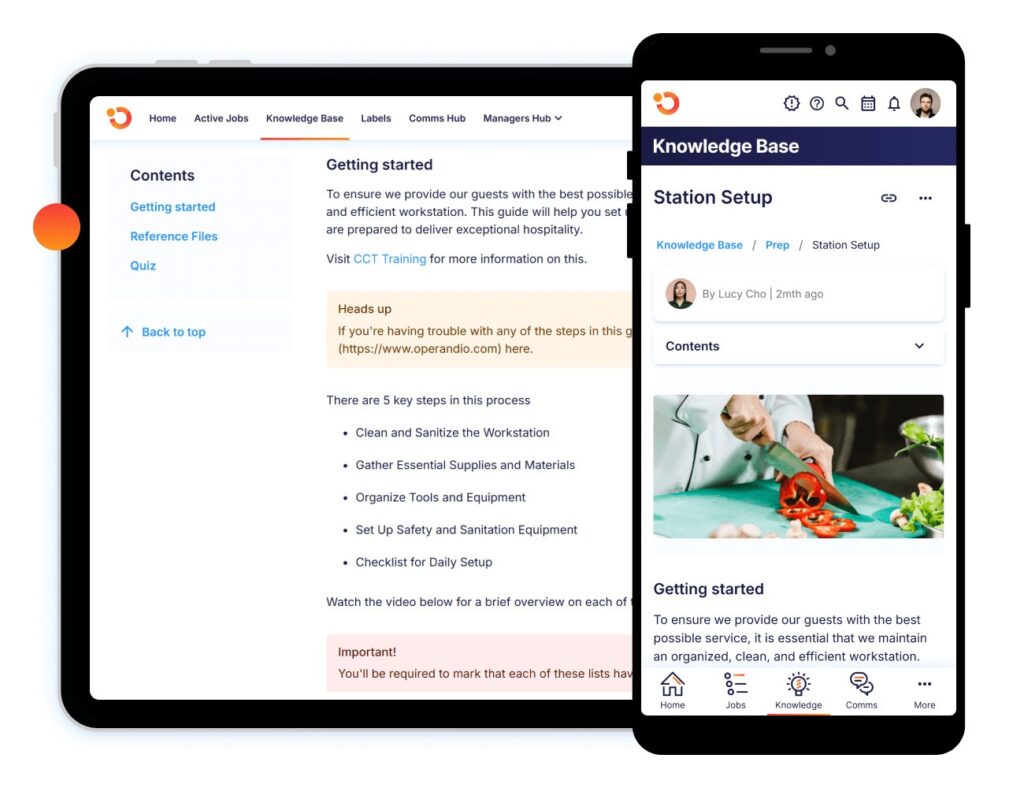
If the manual isn’t accessible when needed, it won’t be used. But using Operandio’s mobile-first digital manuals puts procedures in your employees’ pockets.
Getting Employee Buy-In
Staff resist manuals when procedures feel imposed rather than developed with their input.
Yes, experienced employees resent being told “the right way” by people who don’t do the actual work. Involve frontline staff in the creation to build ownership.
Maintaining Consistency Across Locations
Consistency breaks down when each location starts adjusting procedures to fit “how we do things here.” Over time, minor deviations stack up, and standards that should be universal begin to vary from site to site.
Without enforcement mechanisms, documented procedures become suggestions. A centralized franchise intranet helps maintain consistency through visibility and accountability.
Best Practices for Creating Operations Manuals
These practices separate the manuals employees actually use from those collecting dust.
Start With Minimum Viable Manual
Document your 10-15 most critical procedures first. Get those in the employees’ hands immediately.
Add more procedures based on actual questions staff ask. This creates value fast rather than spending months on comprehensive documentation nobody needs.
Use Real Examples and Scenarios
Include photos of correct execution. Address common scenarios employees actually encounter. A Restaurant manager training should incorporate these real-world examples.
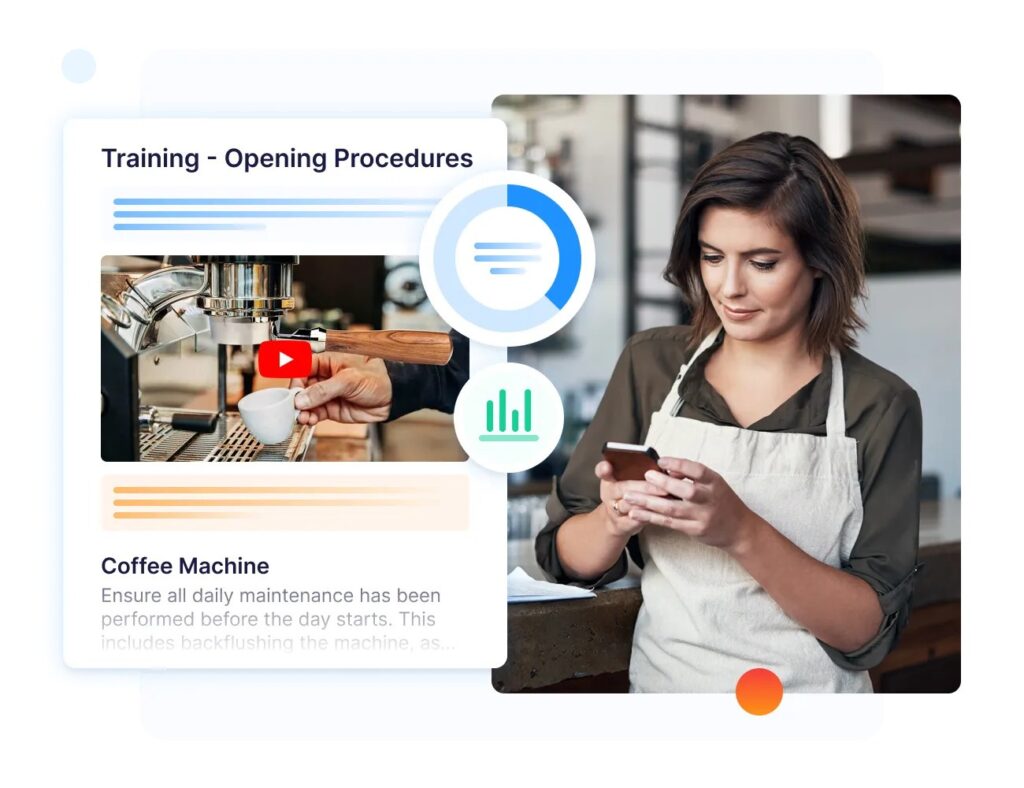
How Operandio Helps: Operandio’s Learning Management Software lets you embed photos, videos, and step-by-step modules as solid examples for training materials.
So staff see exactly what “done correctly” looks like rather than interpreting vague descriptions.
Build in Manager Accountability
Track compliance rates by location and shift. Make manual usage part of manager performance reviews. Understanding legal requirements for restaurant staff training helps frame compliance as non-negotiable.
Test During Slow Periods First
Pilot new procedures during low-stress times. Let staff practice with manual guidance before high-volume rushes.
Identify confusing instructions when mistakes don’t affect service. Refine based on feedback before enforcing during peak periods.
How Operandio Helps: Franchise management software tracks which procedures employees struggle with most. You see real usage data that shows where to focus improvements, rather than guessing.
Make Search and Access Effortless
Employees won’t use manuals they can’t quickly search. Digital platforms with keyword search let your staff find procedures in seconds.
Tag content by role, department, or task type. Organize logically, group related procedures. Operandio’s mobile and tablet apps deliver procedures on devices employees already carry.
Build and Host Your Operations Manual Using Operandio
Operandio centralizes your operations manual in a searchable knowledge base accessible from any device.
It doesn’t only create a digital based operations manual, it gives you the control needed to effect the right changes your desire across multi locations.
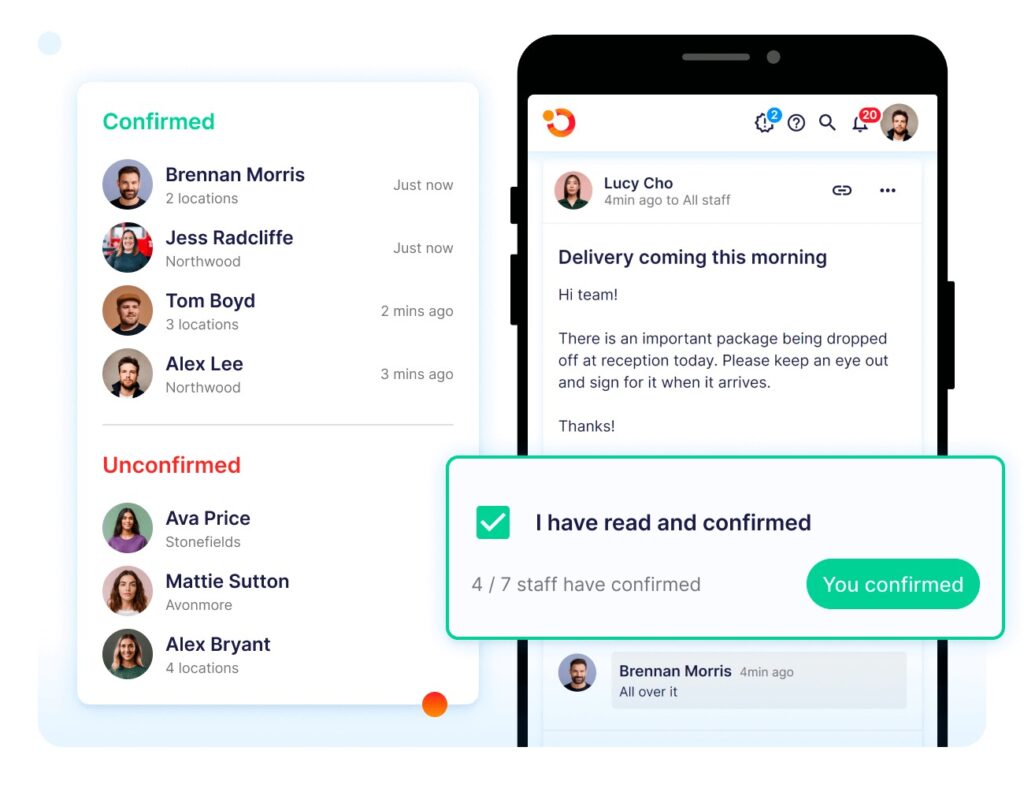
The platform tracks who views which procedures and when. You see whether staff actually reference the manual or ignore it. Compliance becomes visible rather than assumed. Digital checklists ensure procedures get followed, not just documented.
See why franchise operators choose Operandio for operations management, or request a demo to see how digital manuals solve adoption problems that paper can’t.